https://365datascience.com/dwqa-answer/answer-for-customer-analytics-3/ -
Hi Lucky,
definitely not a stupid question and I’m glad you asked. In a Jupyter Notebook a cell can be:
Code, which is executable. Like here: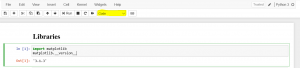
Or it can be a Markdown, which is text, like the ‘Libraries’ cell:
You can select which option you’d like from the Dropdown menu in the toolbar on top of the code, highlighted in yellow.
So, in the Customer Analytics Notebooks, we’ve added Markdown cells with the title of each section, for better readability. If you go to any of these cells and double click it you’ll see the raw text.
As a side note, for those Notebooks we have Latex formating, which may look a bit strange. But in general all you need in a markdown is #(this determines the size of text, ## makes it smaller, and so on) a space and your text, like so:
## -Library
Best,
Eli
#365datascience #DataScience #data #science #365datascience #BigData #tutorial #infographic #career #salary #education #howto #scientist #engineer #course #engineer #MachineLearning #machine #learning #certificate #udemy

No comments:
Post a Comment